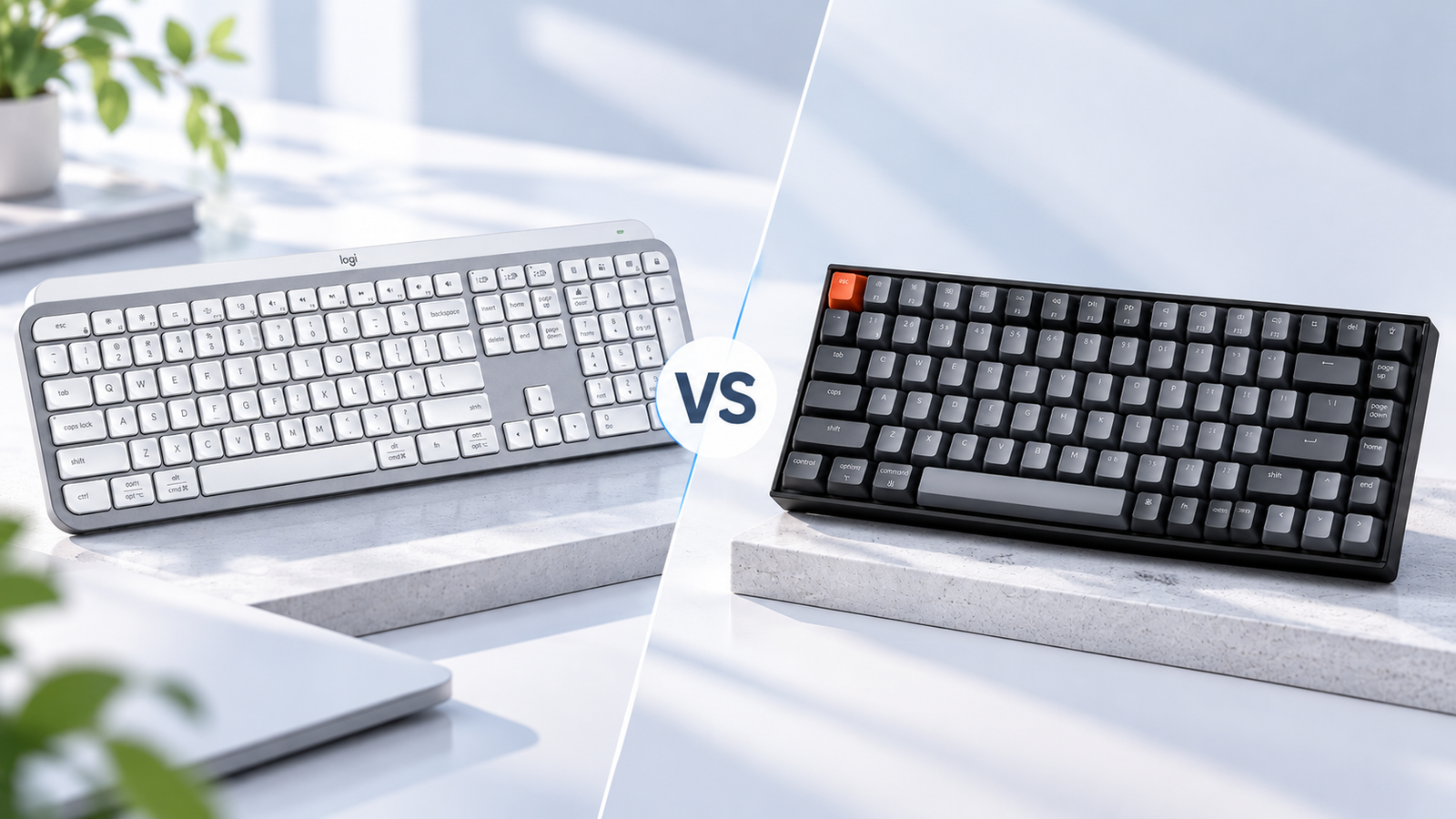
Logitech MX Keys S vs Keychron K2 comes down to two very different approaches to everyday typing. The MX Keys S is a full-size, low-profile keyboard designed around quiet productivity, while the Keychron K2 is a compact 75% mechanical keyboard with hot-swappable switches and a more customizable typing experience.
If you want a quiet keyboard with a familiar full-size layout and easy multi-device switching, the MX Keys S is the more straightforward choice. If you prefer mechanical switches, a smaller footprint, and the ability to change switches later, the Keychron K2 is the better fit.
Research note: This comparison is research-based and not independently hands-on tested by Smart Desk. Product specifications are based on manufacturer information and public documentation.
Quick Comparison: Logitech MX Keys S vs Keychron K2
| Feature | Logitech MX Keys S | Keychron K2 Version 2 |
|---|---|---|
| Keyboard type | Low-profile scissor | Mechanical |
| Layout | Full-size | 75% |
| Number pad | Yes | No |
| Wireless | Bluetooth + Logi Bolt | Bluetooth 5.1 |
| Wired connection | USB-C charging | USB-C wired |
| Multi-device | Up to 3 devices | Up to 3 Bluetooth devices |
| Backlighting | Smart backlighting | White or RGB, depending on configuration |
| Switches | Fixed scissor keys | Gateron G Pro mechanical |
| Hot-swappable | No | Yes |
| Battery | Up to 10 days with backlight on | Up to 240 hours with backlight off |
| Best for | Office & productivity | Mechanical typing & compact setups |
Key Differences Between the MX Keys S and Keychron K2
The biggest difference is not a single specification. It is the way each keyboard is designed to be used.
Logitech MX Keys S
Quiet · Full-size · Productivity
Keychron K2 Version 2
Mechanical · Compact · Customizable
The MX Keys S focuses on a quiet, familiar typing experience, a full-size layout, and productivity features. Its low-profile design makes it a natural fit for office and productivity setups.
The Keychron K2 takes a more compact and mechanical approach. Its 75% layout removes the number pad while keeping the function row and commonly used navigation keys. Its hot-swappable Gateron G Pro switches also give you the option to change the typing feel later.
1. Typing Experience: Low-Profile vs Mechanical
This is where personal preference matters most.
Logitech MX Keys S
- Quiet
- Low-profile
- Best for shorter travel
Keychron K2 Version 2
- More tactile
- Mechanical
- More key feedback
The MX Keys S uses Logitech’s low-profile scissor-style keys, designed for a quiet and consistent typing experience. Its low-profile design also gives it a feel that is familiar to many laptop users.
The K2 Version 2 uses Gateron G Pro mechanical switches and is available with different switch options. Because the switches are hot-swappable, compatible switches can be changed without soldering. For a more detailed look at the K2’s layout, typing experience, battery, and customization, see our Keychron K2 Review.
2. Layout and Desk Space: Full-Size vs 75%
The two keyboards take very different approaches to desk space.
Logitech MX Keys S
Full Size · With Numpad
Keychron K2 Version 2
75% · No Numpad
- Need a numpad? → MX Keys S
- Need more desk space? → K2
3. Wireless & Multi-Device Use
Both keyboards are designed for wireless use, but they take different approaches.
Logitech MX Keys S
Bluetooth + Logi Bolt
↓
Device 1 · Device 2 · Device 3
Keychron K2 Version 2
Bluetooth + USB-C
↓
Wireless · Wired
The MX Keys S supports Bluetooth and Logitech’s Logi Bolt receiver, and Logitech allows it to switch between up to 3 connected devices.
The Keychron K2 Version 2 uses Bluetooth 5.1 and can connect to up to 3 devices. It also supports a wired USB-C connection when you want to use it without Bluetooth.
If you frequently move between a work laptop, personal computer, and tablet, both can work well.
4. Features: What Do You Actually Get?
| Feature | Logitech MX Keys S | Keychron K2 Version 2 |
|---|---|---|
| Backlighting | Smart backlighting | Adjustable backlighting, depending on configuration |
| Multi-device switching | Up to 3 devices | Up to 3 Bluetooth devices |
| Productivity software | Logi Options+ | — |
| Mechanical switches | — | Gateron G Pro |
| Hot-swappable | — | √ |
| Number pad | √ | — |
| USB-C | Charging | Wired connection + charging |
| Mac / Windows support | √ | √ |
The important difference is the approach. Logitech focuses more on productivity software and workflow features, while Keychron gives more attention to mechanical typing and switch customization.
5. Battery Life and Charging
Logitech MX Keys S
Up to 10 days
Backlight on / predefined settings
Keychron K2 Version 2
Up to 240 hours
Backlight off, standard version
The MX Keys S can run for up to 10 days with backlighting on, according to Logitech, with longer battery life available when backlighting is turned off.
The Keychron K2 Version 2 uses a 4000mAh rechargeable battery and is rated for up to 240 hours of typing with the backlight off. Actual battery life varies with backlight use and other settings.
For either keyboard, battery life depends on how you use the keyboard and how often the backlight is active.
Best for: Both offer enough battery capacity for regular desk use, but the K2’s 240-hour figure assumes the backlight is off.
Which Keyboard Is Right for You?
Choose the MX Keys S if you:
√ Want quiet typing
√ Need a number pad
√ Office productivity
√ Multi-device productivity
Choose the Keychron K2 if you:
√ Prefer mechanical switches
√ Rarely use a number pad
√ Want a compact desk setup
√ Customize your switches
√ Prefer a more pronounced key feel
√ Wired + wireless flexibility
Neither is universally better. The better choice depends on whether you prioritize productivity and convenience or mechanical feel and compactness.
Alternatives to the MX Keys S and Keychron K2
Logitech MX Mechanical Mini
√
Logitech’s productivity
√
Mechanical
√
Low-profile typing experience
Keychron Q Series
√
Premium mechanical
√
Customization
Keychron K2 HE
√
Magnetic switches
√
Gaming
More detials that should be considered before buying, you could find more tips in How to Choose a Keyboard: A Practical Buying Guide .
For more alternatives, you could find details in Best Keyboards for Work: Top Picks for Different Needs.
Price and Value
Prices vary by configuration, region, and promotions. Prices and availability can change.
Logitech MX Keys S
Keychron K2 Version 2
FAQ
For office productivity, the MX Keys S is the easier choice because of its quiet typing, full-size layout, and multi-device workflow. The K2 is a better fit if you prefer mechanical switches, a compact layout, and switch customization.
Yes. Its 75% layout keeps the function row and common navigation keys while taking up less desk space. The main consideration is whether you prefer mechanical switches and whether you need a number pad.
No. The MX Keys S uses Logitech’s scissor-style keys rather than mechanical switches.
The MX Keys S is generally the better choice if quiet typing is a priority. Its low-profile scissor-style keys are designed for a quieter typing experience, while the K2’s sound depends on its mechanical switch configuration.
Both can work well. The K2’s 75% layout keeps the function and navigation keys while saving desk space, while the MX Keys S provides a full-size layout and number pad. Your preferred typing feel and need for a numpad are the deciding factors.
Final Verdict: MX Keys S or Keychron K2?
The Logitech MX Keys S and Keychron K2 Version 2 are aimed at different kinds of keyboard users.
The MX Keys S is the better fit for quiet productivity, full-size layouts, and convenient multi-device work. The Keychron K2 makes more sense for mechanical typing, compact desks, and users who want switch customization.
If you already know which side of that trade-off fits your setup, the choice is fairly straightforward.
Ready to Choose Your Keyboard?
Logitech MX Keys S: Best for quiet typing, a full-size layout, and convenient multi-device productivity.
Keychron K2 Version 2: Best for mechanical typing, a compact layout, and switch customization.
Disclosure: Smart Desk may earn commissions from qualifying purchases made through affiliate links. This does not affect the price you pay and helps support our research-based content.
Sources & Last Updated
Primary sources:
- Logitech — MX Keys S
- Keychron — K2 Wireless Mechanical Keyboard (Version 2)
- Keychron — K2 Hot-swappable Wireless Mechanical Keyboard (Version 2)
Last Updated: October 4, 2026
Research status: Research-based comparison. Smart Desk has not independently hands-on tested these products.