
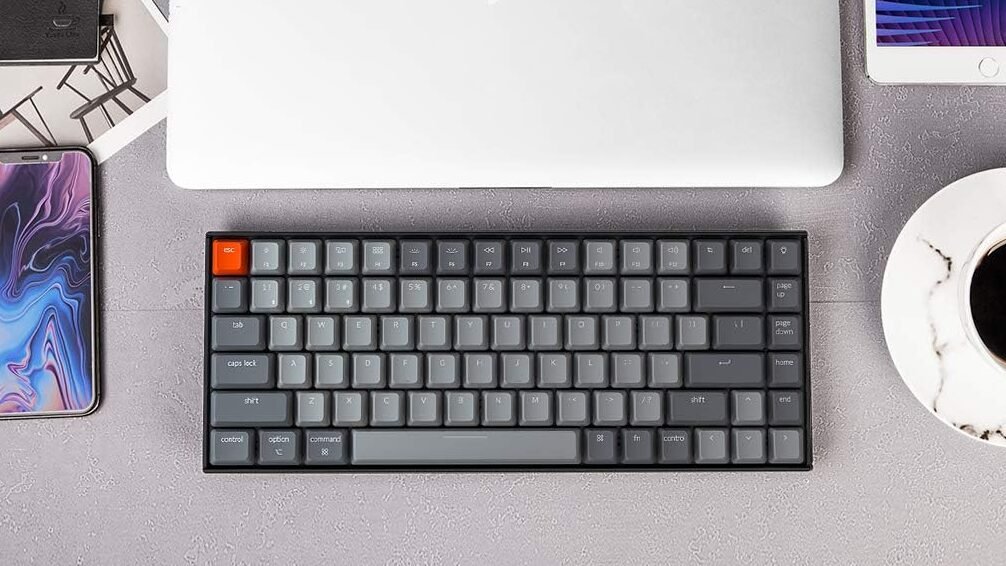
Keychron K2 review: the K2 Version 2 is a compact 75% wireless mechanical keyboard designed for users who want mechanical switches without taking up the space of a full-size keyboard. Its hot-swappable design, Bluetooth connectivity, and 4000mAh battery make it a flexible option for work, home, and compact desk setups.
The K2 is not the slimmest or quietest keyboard available, but it offers a useful balance of size, mechanical typing feel, wireless connectivity, and customization.
Quick Verdict
The Keychron K2 Version 2 is a good choice if you want a compact mechanical keyboard that can work wirelessly across multiple devices while still giving you the option to customize its switches.
Its biggest strengths are the 75% layout, hot-swappable switches, Bluetooth 5.1, USB-C wired mode, and 4000mAh battery. The main trade-offs are its relatively tall mechanical design and the lack of a dedicated number pad.
Our take: The K2 makes the most sense for users who want a mechanical keyboard with more flexibility than a basic office keyboard, without moving to a larger or more expensive enthusiast-focused model.
At a Glance
75%
84 keys
Gateron G Pro Mechanical
Bluetooth 5.1
Multi-device
Up to 3 devices
Wired
USB-C
Battery Life
Up to 240 hours
Weight
663g plastic / 794g aluminum
Key Strength & What to Consider
What Stands Out
- Compact 75% layout
- Hot-swappable mechanical switches
- Bluetooth 5.1 with up to 3 devices
- USB-C wired mode
- Large 4000mAh battery
- Mac and Windows-friendly layout
- Multiple switch and frame configurations
What to Consider
- No dedicated number pad
- Taller than low-profile keyboards
- Mechanical switches can be louder than scissor-style keyboards
- Battery rating of up to 240 hours assumes the backlight is off
- Configuration options can make the product lineup confusing
Who Is the Keychron K2 For?
A good fit if you:
√
Users moving from a basic membrane keyboard to mechanical switches
√
Compact home-office setups
√
Programmers and frequent typists
√
Users who want switch customization
√
Mac and Windows users
√
Multi-device setups
Consider another mouse if:
×
Users who regularly need a number pad
×
Users who prefer laptop-style low-profile keys
×
Quiet-office environments where keyboard noise matters
×
Users looking for an ultra-slim keyboard
×
Anyone who does not need mechanical switch customization
If you’re still deciding which keyboard size, layout, or switch type fits your setup, see our How to Choose a Keyboard guide before comparing specific models.
Deep Explore for Keychron K2
1. Design & Layout
The K2 uses a 75% layout, giving you a smaller footprint while keeping the function row, arrow keys, and commonly used navigation keys.
With 84 keys, it sits between a traditional full-size keyboard and smaller 65% or 60% designs.
This makes the K2 particularly useful when desk space matters but you do not want to give up the function row.
The main compromise is the missing number pad. If you frequently work with spreadsheets or enter numbers, a full-size keyboard may be more practical.
2. Typing Experience
The hot-swappable K2 Version 2 usesGateron G Pro mechanical switches, available in Red, Blue, and Brown options.
That gives buyers more choice over typing feel:
Red
smoother, linear feel
Brown
tactile feedback without a loud click
Blue
more pronounced tactile and clicky feedback
The hot-swappable design is one of the K2’s strongest features. You can replace compatible switches without soldering, which makes it easier to change the typing feel later.
This also gives the keyboard more room to grow with you than a fixed-switch office keyboard.
3. Wireless & Multi-Device Connectivity
The K2 supports Bluetooth 5.1 and can connect to up to 3 devices.
You can use it with combinations of computers, tablets, and other compatible devices, then switch between them when needed.
For users who regularly move between a work laptop and personal computer, this is a useful feature.
The keyboard also supports a USB-C wired connection, so you are not limited to Bluetooth.
The wired mode also supports a higher polling rate than Bluetooth, which can be useful for users who want a direct connection.
4. Battery Life
The K2 uses a 4000mAh rechargeable battery.
Keychron rates it for up to 240 hours of typing with the backlight turned off. Backlight use will reduce battery life, so the 240-hour figure should not be treated as a typical result for every setup.
This is still a useful battery capacity for a wireless mechanical keyboard, particularly for users who prefer to keep the keyboard wireless most of the time.
5. Backlighting
Depending on the configuration, the K2 is available with adjustable backlighting, including RGB versions.
RGB backlighting can be useful if you want more visual customization, while users who do not care about lighting can choose a simpler configuration where available.
The important thing is to check the exact configuration before buying because backlight type, frame material, and switch options vary between K2 versions.
6. Mac & Windows Compatibility
The K2 is designed to work withmacOS, Windows, and Linux.
It also includes keycaps for both Mac and Windows layouts, which makes it easier to switch between operating systems.
For users who use both a Mac and a Windows PC, this is more convenient than buying a keyboard designed around only one platform.
7. Customization
Customization is one of the main reasons to consider the K2 instead of a conventional productivity keyboard.
The hot-swappable sockets allow compatible mechanical switches to be replaced without soldering.
The K2 Version 2 also supports QMK firmware and Keychron’s Launcher web app for key remapping and customization.
That gives more experienced users additional control over their keyboard layout and shortcuts.
For someone who simply wants a keyboard that works out of the box, these features may not matter much. But for users who enjoy customizing their setup, they add meaningful long-term value.
8. Build & Size
The K2 is available with either a plastic frame or an aluminum-frame configuration.
The plastic version weighs about 663g, while the aluminum-frame version is about 794g.
Its compact footprint is one of its biggest practical advantages, but the keyboard is not especially slim. The mechanical construction and taller key profile make it noticeably different from low-profile keyboards such as the Logitech MX Keys S.
So while the K2 saves desk space horizontally, it does not offer the same slim profile as a laptop-style keyboard.
9. Everyday Use
The K2 works particularly well when you want one keyboard for several types of use.
Office work
The compact layout saves desk space while retaining the function row and arrow keys.
Programming
The 75% layout provides useful navigation and function keys without the footprint of a full-size keyboard.
Home setups
Bluetooth and multi-device support make it easy to use with different computers and tablets.
Alternatives
Logitech MX Keys S
A better fit for users who prioritize quiet typing, a full-size layout, and productivity-focused features over mechanical customization.
Keychron K2 HE
A more specialized K2 variant for users interested in magnetic switches and gaming-oriented features. It is a different product from the K2 Version 2 reviewed here.
Keychron Q Series
A stronger option for users who want to move further into premium mechanical keyboards and more advanced customization.
Not sure which fits your setup?
Read the full comparison → Logitech MX Keys S vs Keychron K2: Which Keyboard Should You Choose?.
Current Price
The Keychron K2 Version 2 Hot-swappable is listed at around $84.99 on Keychron’s official site, although the exact price can vary by backlight, frame, and switch configuration.
Because Keychron frequently offers different configurations and promotions, it is worth checking the current price before buying.
FAQ
The hot-swappable Version 2 is. It uses hot-swappable sockets that allow compatible mechanical switches to be replaced without soldering.
The 4000mAh battery is rated for up to 240 hours of typing with the backlight turned off. Actual battery life depends on backlight use and other settings.
Yes. The K2 is relatively approachable for users who want to try a mechanical keyboard without starting with a highly specialized enthusiast model. The 75% layout is also easier to adapt to than many smaller 60% keyboards.
Yes, especially if you prefer mechanical switches and want a compact desk setup. However, users who prioritize very quiet typing may prefer a low-profile scissor-style keyboard.
Yes. It supports macOS, Windows, and Linux, and includes keycaps for both Mac and Windows layouts.
Final Takeaway
The Keychron K2 Version 2 is a strong choice for users who want a compact wireless mechanical keyboard without giving up the flexibility to customize their typing experience.
Its 75% layout, hot-swappable switches, multi-device Bluetooth, USB-C connectivity, and large battery give it a practical combination of features for work and everyday use.
It is not the right choice for everyone. If you need a number pad, prefer a very slim keyboard, or want the quietest possible typing experience, another keyboard may fit better.
For users who want compact size + mechanical switches + wireless flexibility + customization, the K2 remains a compelling option.
If you want to compare the K2 with other work-focused options, see our Best Keyboards for Work for more picks.
For more options, see Best USB-C Hubs Under $50: Research-Based Picks for 2026.
Ready to Choose Your Keyboard?
Prices and availability can change, so check the current listing before purchasing.
Disclosure: Smart Desk may earn commissions from qualifying purchases made through affiliate links. This does not affect the price you pay and helps support our research-based content.
Sources & Last Updated
Primary sources:
- Keychron — K2 Wireless Mechanical Keyboard (Version 2)
- Keychron — K2 Hot-swappable Wireless Mechanical Keyboard (Version 2)
Last Updated: October 5, 2026
Research status: Research-based review. Smart Desk has not independently hands-on tested this product.