
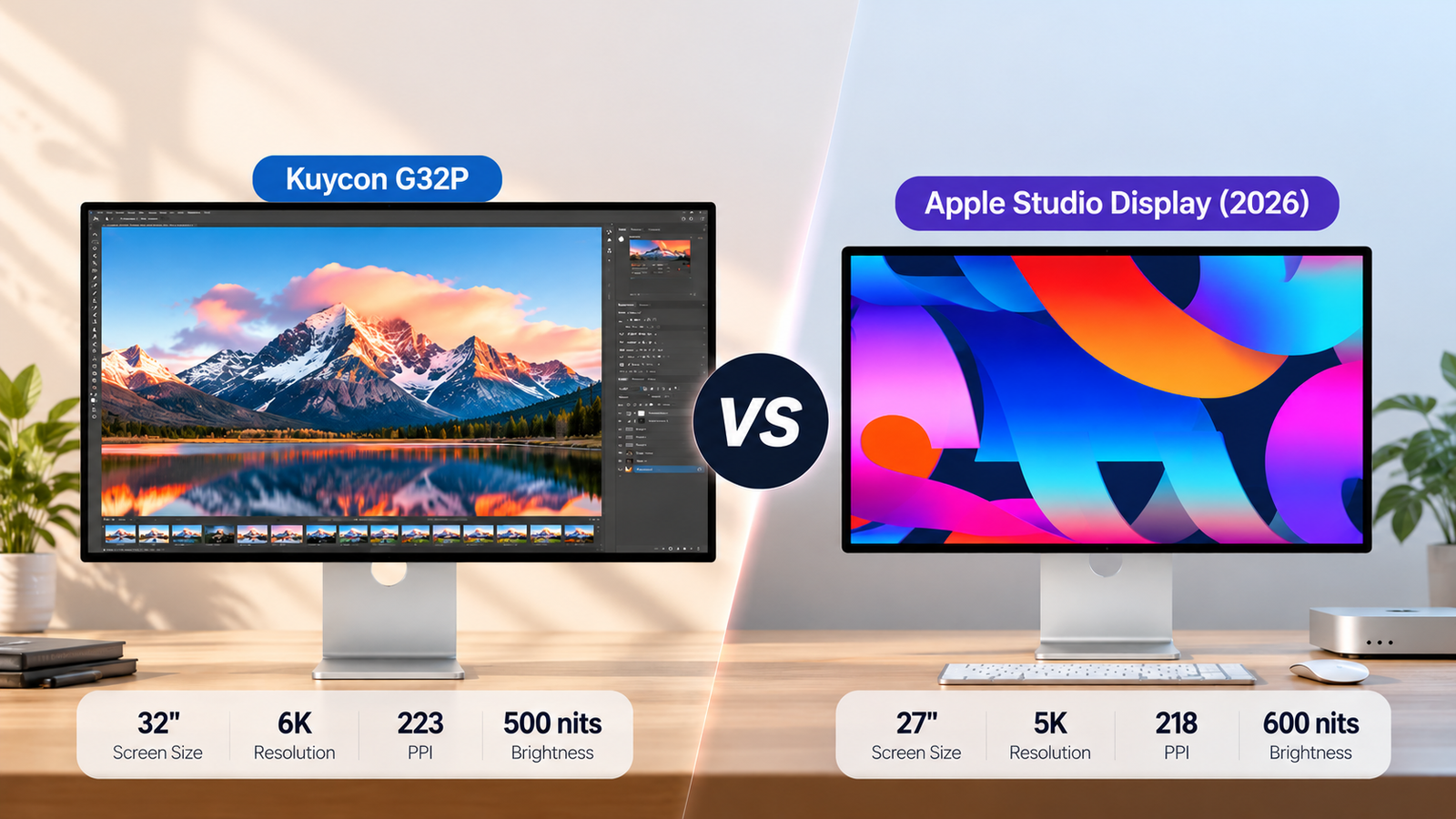
A 27-inch 5K monitor can make text look beautifully sharp on a Mac. But what happens when your workday involves a code editor, browser, documentation, Slack, and spreadsheets—all competing for screen space?
That is where the Kuycon G32P becomes interesting.
With a 32-inch 6K panel and a manufacturer-rated 223 pixels per inch (PPI), the G32P addresses a familiar Mac monitor dilemma: getting more physical screen space without dropping to the much lower pixel density of a typical 32-inch 4K display.
The Apple Studio Display (2026), meanwhile, offers a 27-inch 5K panel rated at 218 PPI, alongside Thunderbolt 5 connectivity, a 12MP Center Stage camera, and integrated audio.
The pricing makes this comparison particularly interesting. For approximately $100 more, the G32P offers a substantially larger screen and more native pixels. But Apple provides a more integrated Mac experience.
So which one is the better investment for your workflow?
This comparison uses published specifications, available third-party information, and community reports. We have not independently tested either display.
Disclosure: Smart Desk may earn commissions from qualifying purchases made through affiliate links. This does not affect the price you pay and helps support our research-based content.
Quick Comparison: Kuycon G32P vs Apple Studio Display(2026)
Kuycon G32P
Best for a Larger High-PPI Workspace
32”
Screen
6K
Resolution
223
PPI
Main Pain Point Solved: A 27-inch screen feels crowded, but switching to a typical 32-inch 4K monitor would mean substantially lower pixel density.
Pros
- Approximately 40% more physical screen area than a 27-inch display.
- High pixel density comparable to Apple’s 5K display.
- More native pixels for detailed, window-heavy workflows.
- Larger 6K workspace for only about $100 more than the standard 2026 Studio Display’s published starting price.
Cons
- Limited independent laboratory testing.
- Panel uniformity and color consistency need further verification.
- No comparable integrated conferencing system established.
- US warranty and return conditions require careful review.
10% Off · 30-Day Returns & Exchanges
Apple Studio Display (2026)
Best for Mac Integration
27”
Screen
5K
Resolution
218
PPI
Main Pain Point Solved: You want a sharp external Mac display with integrated video calling, audio, and modern Thunderbolt connectivity.
Pros
- High-density 5K Retina display.
- Integrated camera, speakers, and microphones.
- Thunderbolt 5 connectivity and compatible daisy-chaining.
- Established Apple support ecosystem.
- Lower starting price than the G32P.
Cons
- Smaller physical workspace.
- Standard model remains limited to 60Hz.
- Premium configurations and accessories can increase total cost.
Quick Verdict: Choose the G32P if you want more physical workspace without giving up high pixel density. Choose the 2026 Studio Display if you prioritize integrated Mac features, conferencing, and Thunderbolt connectivity.
Key Differences Between the Kuycon G32P and Apple Studio Display (2026)
| Feature | Kuycon G32P | Apple Studio Display (2026) | Why It Matters for Mac Users |
|---|---|---|---|
| Screen size | 32 inches | 27 inches | G32P offers ~40% more physical screen area for multitasking and side-by-side windows. |
| Native resolution | 6144 × 3456 | 5120 × 2880 | G32P has ~44% more pixels, though usable workspace depends on macOS scaling. |
| Pixel density | 223 PPI | 218 PPI | Both deliver Retina-like sharpness for text, coding, and reading. |
| Refresh rate | 60Hz | 60Hz | Both suit everyday productivity, but neither offers high-refresh-rate smoothness. |
| Advertised brightness | 500 nits | 600 nits | Apple’s higher rated brightness may help in well-lit rooms. |
| Wide color gamut | 99% DCI-P3, manufacturer-listed | P3 wide color | Both target wide-color workflows; gamut coverage alone doesn’t prove color accuracy. |
| Main connectivity | USB-C, DisplayPort, HDMI | Thunderbolt 5, USB-C | G32P offers varied video inputs; Apple favors Thunderbolt-based Mac setups. |
| Laptop charging | Up to 100W | Up to 96W | Both can charge compatible MacBooks through a single cable. |
| Built-in camera | No comparable camera listed | 12MP Center Stage | Apple eliminates the need for a separate webcam for many video calls. |
| Audio | Verify configuration | Six speakers, three microphones | Apple’s integrated audio reduces the need for extra desk accessories. |
| US starting price | $1,849.99 ($1664.99 with discount) | $1,599 | G32P costs ~$100 more but offers a substantially larger high-PPI display. |
| Main advantage | Larger high-PPI workspace | Mac integration and built-in features | Choose G32P for workspace; choose Apple for integrated convenience. |
Specifications and starting prices are based on manufacturer-published information reviewed on October 24, 2026. They are not independent measurements. Actual prices and configurations may vary.
The biggest difference is not the relatively small PPI gap. It is how much physical space each display provides—and what features you receive for the money.
Screen Size and Workspace: 32-Inch 6K vs 27-Inch 5K
Why a 27-Inch Screen Can Feel Cramped
A 27-inch Studio Display is large enough for many everyday tasks. But more demanding workflows can expose its limitations.
Consider a developer who needs a code editor, browser preview, documentation, and terminal visible simultaneously.
Or a financial analyst comparing a large spreadsheet with a report while keeping communication tools open.
On a 27-inch screen, these workflows may require frequent window switching, overlapping applications, or a second monitor.
The G32P addresses this problem with a larger physical display.
Where the G32P’s Larger Screen May Help
A 32-inch screen has approximately 40% more physical display area than a 27-inch screen with the same aspect ratio.
The G32P also provides approximately 44% more native pixels than the 5K Studio Display.
That combination can be particularly useful for three workflows.
Software development: Keep an editor and documentation side by side while leaving more room for terminal output or browser previews.
Data analysis: View wider spreadsheets, reports, and dashboards without making every application window feel cramped.
Design and content production: Give the main canvas more physical room while keeping tools, reference material, or timelines visible.
These are potential workflow benefits rather than independently measured productivity improvements.
The G32P may also appeal to users who want to avoid a dual-monitor arrangement.
Instead of adding another display, stand, and cable, one larger screen may provide a simpler workspace.
Does 6K Automatically Mean More Usable Workspace?
Not necessarily.
macOS uses display scaling to balance interface size and sharpness. A higher-resolution monitor can render interface elements using more physical pixels, but the selected scaled workspace determines how much content fits.
The G32P’s 6K resolution provides a high-density foundation for choosing a comfortable scaling mode.
However, you should verify that your Mac supports the desired resolution and refresh rate through the intended connection.
Buying Takeaway: The G32P’s strongest workspace advantage is its combination of larger physical size and high pixel density—not a guarantee that every scaling setting provides more usable space.
Text Clarity: Can the G32P Match the Retina-Like Experience?
For many Mac users, text clarity matters more than resolution numbers alone.
The Apple Studio Display (2026) offers 218 PPI. Kuycon lists the G32P at 223 PPI.
Both figures are substantially higher than the approximately 138 PPI of a typical 32-inch 4K display.
That difference helps explain why the G32P is interesting.
A typical 32-inch 4K monitor gives you a larger screen than a 27-inch 5K display, but at significantly lower pixel density.
The G32P avoids that particular compromise on paper.
For writing, programming, reading, and spreadsheet work, this could be a meaningful advantage.
However, similar PPI figures do not prove identical text quality.
Panel subpixel structure, screen coating, macOS scaling, and software rendering can all affect perceived sharpness. Manufacturing consistency also matters.
RTINGS explains these factors in its monitor text-clarity testing methodology.
Winner for published pixel density: G32P, by a small numerical margin.
Winner for real-world text rendering: Not established without controlled side-by-side testing.
Color Accuracy and Display Quality: Where the Risks Differ
High resolution is only one part of display quality.
Color accuracy, brightness uniformity, contrast, reflections, and calibration behavior can matter just as much—especially for photography and design.
Kuycon advertises 99% DCI-P3 coverage for the G32P. Apple lists P3 wide-color support for the 2026 Studio Display.
However, color-gamut coverage does not establish color accuracy.
A display can reproduce a wide range of colors while still showing inaccurate tones or uneven color temperature.
What Community Feedback Suggests
Public G32P discussions include positive impressions of screen space and sharpness, alongside individual complaints about color uniformity and calibration.
These reports are useful warning signals, but they do not establish how frequently defects occur.
For buyers doing color-critical work, the important questions are:
- Has the monitor been independently tested for color accuracy?
- How uniform are brightness and white balance across the panel?
- Does calibration meaningfully improve the results?
- Does the screen coating suit your lighting environment?
Buyer Watch-Out: Panel Consistency
Some community reports describe G32P color-uniformity concerns. These are individual experiences, not verified defect-rate data.
Who should be cautious: Photographers, designers, and buyers who require consistent color across the entire screen.
What to do: Look for independent measurements and review the return policy before purchasing.
The Studio Display benefits from Apple’s established display ecosystem, but its published specifications should not be mistaken for independent test results either.
Connectivity and Mac Compatibility
The 2026 Studio Display introduces an important advantage over the original model: Thunderbolt 5 connectivity.
That matters for Mac users who want to connect compatible peripherals, transfer data, or build a more integrated workstation.
Apple also supports compatible display daisy-chaining configurations, subject to the Mac’s capabilities and connection requirements.
The G32P takes a different approach.
It provides USB-C, DisplayPort, and HDMI connectivity, offering several ways to connect compatible devices.
For users who switch between a Mac and another computer, multiple video input options may be useful.
What to Check Before Connecting the G32P
Before ordering, confirm:
- Your Mac supports the G32P’s native 6K output.
- Your intended cable and connection support 6K at 60Hz.
- Your MacBook’s charging requirements match the advertised power delivery.
- Any additional peripherals have suitable connections.
Do not assume every Mac with USB-C can output 6K through every cable, adapter, or dock.
Apple publishes model-specific external-display compatibility information through its Mac technical specifications.
Connectivity Takeaway: Apple has the stronger integrated Thunderbolt workstation proposition. The G32P offers multiple video input types, but compatibility should be verified for your exact Mac setup.
Features and Everyday Convenience
The 2026 Studio Display’s strongest argument is not simply its 5K resolution.
It is the integrated desktop experience.
Apple includes a 12MP Center Stage camera with Desk View, a six-speaker sound system, and a three-microphone array.
These features can be valuable for someone who regularly joins video meetings and wants fewer separate accessories.
The G32P offers a different value proposition.
If you already use a dedicated webcam, external speakers, or headphones, Apple’s integrated hardware may be less important to you.
In that situation, paying approximately $100 more for a substantially larger high-density screen may be attractive.
This is particularly relevant for developers, analysts, and other professionals who spend most of their day working with multiple windows rather than attending video meetings.
Everyday Convenience Takeaway: The Studio Display is better equipped for an integrated Mac desk. The G32P is more compelling when screen space matters more than bundled conferencing hardware.
Power Delivery and Charging
Kuycon lists up to 100W USB-C Power Delivery for the G32P.
The 2026 Studio Display supports up to 96W host charging through Thunderbolt.
On paper, both can support convenient single-cable arrangements for compatible MacBooks.
However, charging wattage alone should not decide the purchase.
Check whether your MacBook requires more power under demanding workloads and whether the monitor supports your preferred video and charging functions simultaneously.
A one-cable setup is valuable only when it works reliably with your actual equipment.
Which Monitor Is Right for You?
The better monitor depends less on whether you prefer 5K or 6K and more on how you actually use your Mac. Here are three common workflows where the differences between the G32P and the 2026 Studio Display matter most.
Developer / Data Analyst
More Space for Complex Workflows
Recommended Starting Point: Kuycon G32P
Pain Point: Too many windows, not enough screen space.
Why It Fits
- 32-inch 6K display for side-by-side workflows.
- 40% more screen area than a 27-inch display.
- 223 PPI for sharp text and detailed spreadsheets.
Watch Out
- Check macOS scaling and 6K compatibility.
Best For: Coding, spreadsheets, dashboards, and multitasking.
Designer / Photographer
Prioritize Verified Color Performance
Recommended Starting Point: Depends on Color Requirements
Pain Point: Need more canvas space without sacrificing color accuracy.
Why It Fits
- G32P: Larger 6K canvas for editing tools and timelines.
- Studio Display: Established Mac display ecosystem.
- Both offer high pixel density and wide color gamuts.
Watch Out
- Verify independent color accuracy and panel uniformity before buying.
Best For: Photo editing, graphic design, and creative workflows.
Mac User Who Wants a Simple Setup
Integrated Convenience Matters
Recommended Starting Point: Apple Studio Display (2026)
Pain Point: Too many accessories and cables cluttering your desk.
Why It Fits
- Built-in 12MP camera, speakers, and microphones.
- Thunderbolt 5 connectivity.
- 27-inch 5K display with Mac-focused integration.
Watch Out
- Smaller workspace than the G32P.
Best For: Video calls, remote work, and everyday Mac use.
Alternatives to the Kuycon G32P and Apple Studio Display
The G32P and Studio Display are not the only high-density options for Mac users.
If you want a larger display from a more established monitor manufacturer, investigate current 6K models from ASUS ProArt and Dell UltraSharp.
For a 27-inch 5K setup, alternatives such as the ASUS ProArt PA27JCV, BenQ PD2730S, and Kuycon G27P may also deserve consideration.
Compare current availability, measured display performance, connectivity, and regional support before deciding.
For a broader shortlist, see our Best Monitors for Mac guide.
Price and Value: Is the G32P Worth $100 More?
The Kuycon G32P and Apple Studio Display (2026) are closer in starting price than their different screen sizes might suggest.
As of October 24, 2026, Kuycon lists the G32P starting at $1,849.99($1.664.99 after discount) in the US, while Apple’s 2026 Studio Display starts at $1,599 with standard glass and a tilt-adjustable stand.
That makes the G32P approximately $100 more expensive at their published starting prices.
However, the G32P provides a 32-inch 6K display with approximately 40% more physical screen area and 44% more native pixels than Apple’s 27-inch 5K panel.
For Mac users who frequently work with code, large spreadsheets, browser windows, and documentation side by side, that additional screen space may justify the relatively small price difference.
The calculation changes if you value Apple’s integrated features.
The 2026 Studio Display includes Thunderbolt 5 connectivity, a 12MP Center Stage camera with Desk View, a six-speaker audio system, and studio-quality microphones.
The G32P is therefore not the cheaper choice at published starting prices. Its potential value comes from offering a substantially larger high-PPI workspace at a similar overall monitor price.
Compare the Total Setup Cost
| Cost Factor | Kuycon G32P | Apple Studio Display (2026) |
|---|---|---|
| US starting price | $1,849.99($1.664.99 after discount) | $1,599 |
| Screen size | 32 inches | 27 inches |
| Webcam | May require separate purchase | Integrated |
| Speakers and microphone | Check configuration or existing accessories | Integrated |
| Stand and mounting | Verify included configuration | Depends on selected configuration |
| Warranty | Seller-specific; direct US policy lists one year | Verify Apple coverage and optional protection |
| Return flexibility | Direct US policy has restrictive conditions | Depends on purchase channel |
Buying Takeaway: Choose the G32P if additional screen space is worth more to you than Apple’s integrated features. Choose the Studio Display if you prefer a lower starting price and a complete Mac-focused desktop experience.
Prices are US manufacturer-listed starting prices checked on October 24, 2026. Actual prices, promotions, taxes, shipping, and configurations may vary.
What About Kuycon’s US Warranty?
Price is not the only cost consideration.
Kuycon’s published US direct-purchase policy lists a one-year limited warranty and a short change-of-mind return window with conditions.
These terms matter because independent G32P testing and long-term reliability data remain limited.
Before buying, verify the authorized seller, return eligibility, shipping costs, and warranty provider.
Kuycon G32P vs Apple Studio Display (2026): FAQ
It may be a better fit for developers who frequently keep multiple windows open. Its 32-inch screen provides more physical area than the 27-inch Studio Display while retaining high pixel density. The actual benefit depends on macOS scaling and your preferred window layout.
Not automatically. Pixel density, viewing distance, screen coating, panel structure, and scaling all affect perceived sharpness. The G32P’s advertised 223 PPI is only slightly higher than the Studio Display’s 218 PPI.
Compatibility depends on the specific MacBook, its supported external-display modes, and the connection used. Check Apple’s technical specifications for your Mac and Kuycon’s connection requirements before purchasing.
Not at the published US starting prices used in this comparison. The G32P starts at $1,699, while the 2026 Studio Display starts at $1,599.
The G32P’s value comes from offering a larger 32-inch 6K workspace for approximately $100 more, rather than from having a lower starting price.
Kuycon has real product discussions in enthusiast communities, but its independent testing and long-term reliability evidence are more limited than those of established monitor brands.
Buyers should verify the seller, warranty eligibility, return policy, and available support before purchasing.
It is worth considering if your primary goal is a larger high-PPI workspace and the additional screen area justifies the price difference.
The Studio Display remains attractive for users who prioritize integrated Mac features, Thunderbolt connectivity, and a more established support ecosystem.
Final Verdict: Kuycon G32P or Apple Studio Display (2026)?
Choose the Kuycon G32P if your biggest problem is limited workspace.
Its 32-inch 6K panel offers a compelling combination of physical screen size and high pixel density.
For coding, data analysis, complex multitasking, and other window-heavy workflows, that combination may be more useful than Apple’s integrated camera and speakers.
At published starting prices, the G32P costs approximately $100 more than the 2026 Studio Display but provides significantly more physical screen area and native pixels.
That makes it an interesting alternative for Mac users who value workspace size above integrated features.
However, the limited independent testing and restrictive direct-purchase return terms deserve serious consideration.
Choose the Apple Studio Display (2026) if your priority is a polished, integrated Mac desktop.
Its 27-inch 5K panel provides high pixel density, while Thunderbolt 5, the 12MP Center Stage camera, and integrated audio simplify everyday use.
It also starts at a slightly lower price.
Neither monitor is the universal winner.
The G32P addresses the pain point of wanting more screen space without giving up high pixel density.
The Studio Display addresses the desire for a highly integrated external Mac display.
Your workflow—and the verified total cost of the setup—should decide.
Ready to Choose Your Mac Monitor?
The Kuycon G32P is worth considering if you want a 32-inch 6K workspace and high pixel density at a price close to Apple’s standard 27-inch display.
The Apple Studio Display (2026) combines a 27-inch 5K panel with Thunderbolt 5, a built-in camera, microphones, and speakers.
Still comparing options? Read our Best Monitors for Mac guide to explore more high-resolution alternatives.
Sources & Last Updated
Primary sources:
- Kuycon G32P Official Specifications — Resolution, size, pixel density, connectivity, and manufacturer specifications.
- Apple Studio Display (2026) Specifications — Current Studio Display technical specifications.
- Apple Newsroom — Official 2026 product announcement and release information.
- Apple Mac Technical Specifications — Model-specific external-display compatibility.
- RTINGS Monitor Text Clarity Testing — Factors influencing perceived text clarity.
- MacRumors Forums — Community discussion and user experiences; anecdotal evidence only.
- Reddit r/HiDPI_monitors — Enthusiast discussion; not representative of overall product reliability.
Editorial Note: Prices, availability, product configurations, and regional policies may change. Verify these details with the seller before purchasing. Manufacturer specifications do not guarantee identical real-world performance.
Last Updated: October 24, 2026
Research status: Research-based comparison. Smart Desk has not independently hands-on tested these products.