

Your office chair feels perfectly fine—until you try to push it under your desk. The armrests hit the edge, the chair sticks out, and your already-small workspace suddenly feels even more cramped.
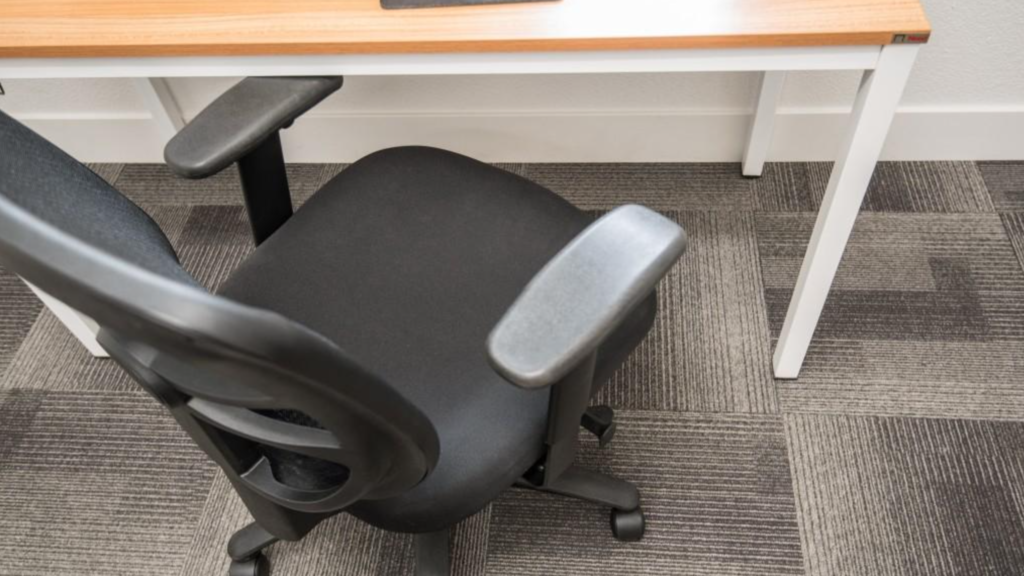
If your armrests hit your desk, don’t replace your chair before checking these three measurements.
If you still want arm support while working, a chair with flip-up armrests—like the FelixKing Ergonomic Mesh Office Chair—could be worth considering. At around $110, it combines fold-away arms with adjustable lumbar support, so you don’t necessarily have to choose between having armrests and being able to tuck your chair away.
But here’s the catch: flip-up armrests don’t automatically mean a chair will fit under your desk. The seat, wheelbase, and even your desk’s support bars can still get in the way.
And sometimes, a simpler armless chair, like the IKEA FLINTAN, makes more sense.
Before spending money on another office chair, here’s how to figure out which design will actually work for your space.
Disclosure: Smart Desk may earn commissions from qualifying purchases made through affiliate links. This does not affect the price you pay and helps support our research-based content.
Quick Answer: Flip-Up Arms, No Arms, or Fixed Arms?
Choose based on how you work and how much clearance your desk provides.
Flip-Up Armrests Copy
Best to consider if you need arm support while working but want extra clearance to slide your chair under the desk.
No Armrests
Best to consider if you rarely use armrests and want a simpler solution for a tight desk opening.
Fixed Armrests
Best to consider if your chair already fits comfortably and you prefer consistent arm support.
Our take: Flip-up armrests are worth considering when you genuinely need two different configurations: supported arms during work and extra clearance when storing the chair.
But if you never use armrests, paying for a folding mechanism may be unnecessary. An armless chair could be the simpler choice.
And if you already have enough clearance, there’s no reason to replace a comfortable chair just for foldable arms.
Why Your Office Chair Arms Keep Hitting Your Desk
There are three common reasons an office chair doesn’t fit underneath a desk.
1. The armrests are higher than your desk’s available clearance
This is the most obvious problem.
Your chair might have a comfortable seat height, but the armrests sit above the lowest point of the desk.
That obstacle may be the underside of the desktop, a support beam, a keyboard tray, or a drawer—not necessarily the desktop itself.
If your armrests are too tall, you may be unable to slide the chair underneath without lowering the seat.
But lowering your seat simply to store the chair isn’t the same as finding a comfortable working position.
2. Your chair is too wide for the opening
Even if the armrests are low enough, the chair may still be too wide.
Desk legs, drawer units, storage cabinets, and crossbars can restrict the space available for the chair.
A flip-up design might eliminate interference from the armrests, but it doesn’t automatically make the chair’s wheelbase or seat narrower.
That’s why checking overall dimensions matters just as much as checking armrest height.
3. Your armrests prevent you from sitting close enough to work
This problem is easy to overlook because the chair may technically fit beneath the desk.
If fixed armrests hit the desk edge before you can get close enough to your keyboard and mouse, you may need to extend your arms or lean forward.
OSHA’s computer workstation guidance specifically recommends armrests that support the forearms without interfering with chair positioning. It also notes that armrests that prevent the chair from getting close enough to the keyboard can contribute to awkward reaching and leaning.
In other words, your chair needs to fit your working position, not just your storage space.
Source: OSHA — Computer Workstations: Chairs
Measure These Three Things Before Buying Another Chair
A tape measure can save you from replacing one poorly fitting chair with another.
Here’s the practical checklist.
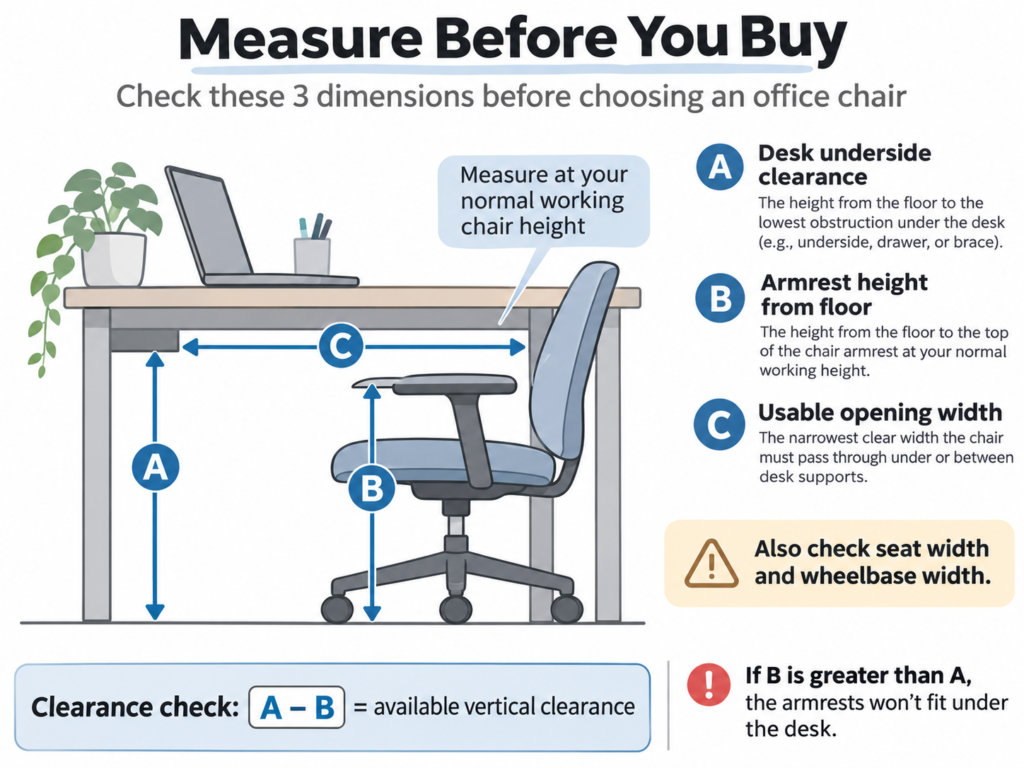
Measurement 1: Desk clearance height
Measure vertically from the floor to the lowest obstruction the chair needs to pass beneath.
This could be:
- The underside of the desktop
- A drawer or keyboard tray
- A structural support bar
- A cable-management tray mounted beneath the desk
Call this measurement A.
Don’t simply use the advertised desk height. The desktop itself has thickness, and accessories underneath can reduce usable clearance.
Measurement 2: Armrest height at your normal working position
Adjust your chair to the height you actually use when typing.
Then measure from the floor to the highest part of the armrest.
Call this measurement B.
Now calculate:
Available vertical clearance = A − B
For example, suppose your desk has 27 inches of clearance and your armrests are 28 inches above the floor.
27 − 28 = −1 inch
Your armrests are one inch too high to pass beneath that obstruction.
That’s a measurable fit problem—not necessarily a reason to buy an entirely new desk.
But remember that zero clearance is not a comfortable margin. Exact contact can still cause scraping, especially on uneven floors.
Measurement 3: The usable opening width
Measure the narrowest opening your chair must pass through.
Then compare that with the chair’s widest relevant dimension when you’re pushing it under the desk.
Check the armrests, seat, and wheelbase separately. One of them may be wider than the others.
For flip-up armrests, make sure you know the chair’s dimensions with the arms in their stored position.
Important: A chair can pass the height test and fail the width test. It can also clear both measurements while still being blocked by a drawer or desk leg during movement.
Before buying, mark the proposed chair’s footprint on the floor with painter’s tape to visualize how much space it needs.
Desk Clearance Calculator
See if your office chair’s armrests can fit under your desk.
Height-only check. Also measure seat width, wheelbase width and desk obstructions.
Option 1: Flip-Up Armrests — Best When You Need Support and Storage Flexibility
Flip-up armrests solve a particular problem: you want armrests while working, but you don’t want them permanently occupying the same space.
During computer work, you can lower the armrests for support.
When you finish, you can raise them and potentially push the chair farther under the desk.
That is a practical advantage over permanently fixed armrests—provided the chair’s remaining dimensions fit.
An example: FelixKing Ergonomic Mesh Office Chair
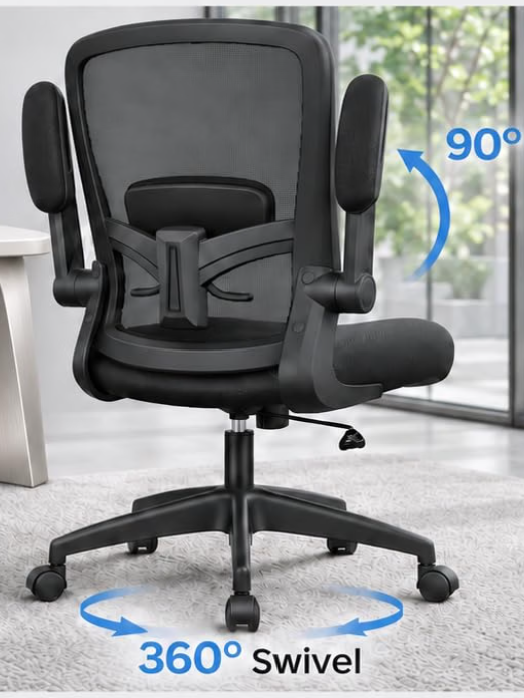
FLIP-UP ARMREST OPTION
FelixKing Ergonomic Mesh Office Chair
$109.99
Worth considering if you need arm support during work and a fold-away design for storage.
Trade-off: Folded clearance and long-term durability not independently verified.
The FelixKing ergonomic mesh office chair is one example of this design.
At a reference Amazon US price of $109.99, its listing describes:
- Flip-up armrests
- Adjustable lumbar support
- Breathable mesh backrest
- Height and tilt adjustment
- High-density foam seat cushion
- Manufacturer-stated 300 lb maximum capacity
- Manufacturer-advertised five-year warranty
Price reference: November 7, 2026. Features, capacity, and warranty are based on the seller’s product description, not independent testing.
Why consider FelixKing instead of a conventional IKEA office chair?
For this specific problem, the reason isn’t simply price.
It’s the ability to switch between having armrests available and moving them out of the way.
If you regularly alternate between several hours of keyboard work and storing your chair beneath a compact desk, that feature may be useful.
FelixKing also advertises adjustable lumbar support, which may appeal to shoppers who want more control over backrest fit.
However, there are important limitations.
We have not independently confirmed the exact folded-armrest height, complete seat-height adjustment range, or long-term durability of this ASIN.
So we cannot say it will fit your particular desk, provide better support than IKEA, or last longer.
When flip-up arms make sense:
You actively use armrests while working, your desk opening is restricted by the arms rather than the seat or base, and you are willing to check the folded dimensions carefully.
When they don’t:
Your desk is blocked by a cabinet or narrow opening, you rarely use armrests, or you need more precise armrest height and width adjustments than the chair provides.
Option 2: No Armrests — The Simpler Solution for Tight Spaces
Sometimes the most practical solution is to remove the obstacle entirely.
An armless chair eliminates armrest interference and can make it easier to move around a compact workstation.
It may also suit people who prefer keeping their arms free or who receive adequate forearm support from the work surface.
But going armless comes with a trade-off.
If you rely on chair armrests to support your forearms, removing them may leave you without comfortable support during certain tasks.
The answer depends on your keyboard height, desk configuration, body dimensions, and personal preferences.
An example: IKEA FLINTAN without armrests
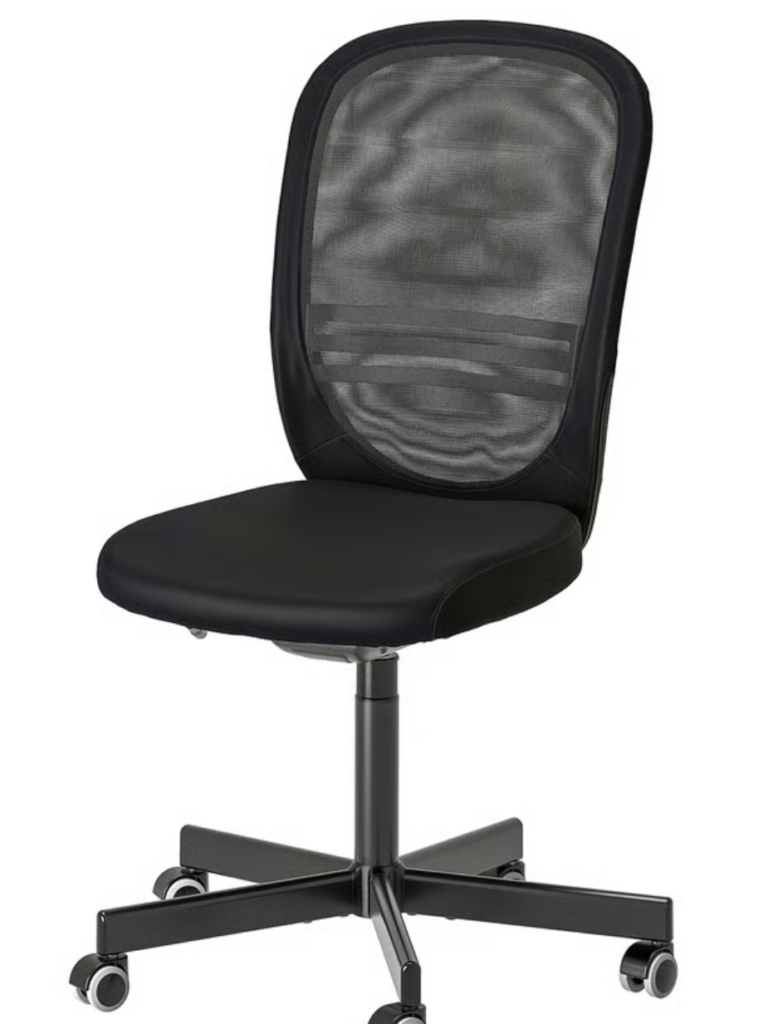
ARMLESS OPTION
IKEA FLINTAN without Armrests
$99.99
A simpler choice if you don’t use chair armrests and have limited side clearance.
Trade-off: No built-in forearm support.
The IKEA FLINTAN office chair without armrests is listed at $99.99 in the US.
It offers a mesh backrest, height adjustment, lumbar support, and a removable washable seat cover.
IKEA also lists a ten-year limited warranty and states that the chair meets ANSI/BIFMA X5.1 office-chair durability and stability requirements.
At the reference prices, it costs $10 less than the FelixKing chair.
That gives IKEA a legitimate advantage for shoppers who don’t need armrests at all.
It would be misleading to say that FelixKing is automatically the better small-space purchase.
If an armless chair meets your needs, the FLINTAN may be the more straightforward option.
When an armless chair makes sense:
You have very limited clearance, don’t rely on armrests, or want a simple chair with fewer armrest-related fit problems.
When it doesn’t:
You frequently depend on armrests for support and can’t get a comfortable forearm position using your desk alone.
Option 3: Fixed Armrests — Fine If Your Desk Has Enough Clearance
Fixed armrests are not inherently a bad design.
If the armrests sit at a comfortable height and allow you to approach the keyboard naturally, there may be no practical reason to change them.
They’re particularly worth considering when your desk setup is stable and you rarely need to store the chair completely underneath.
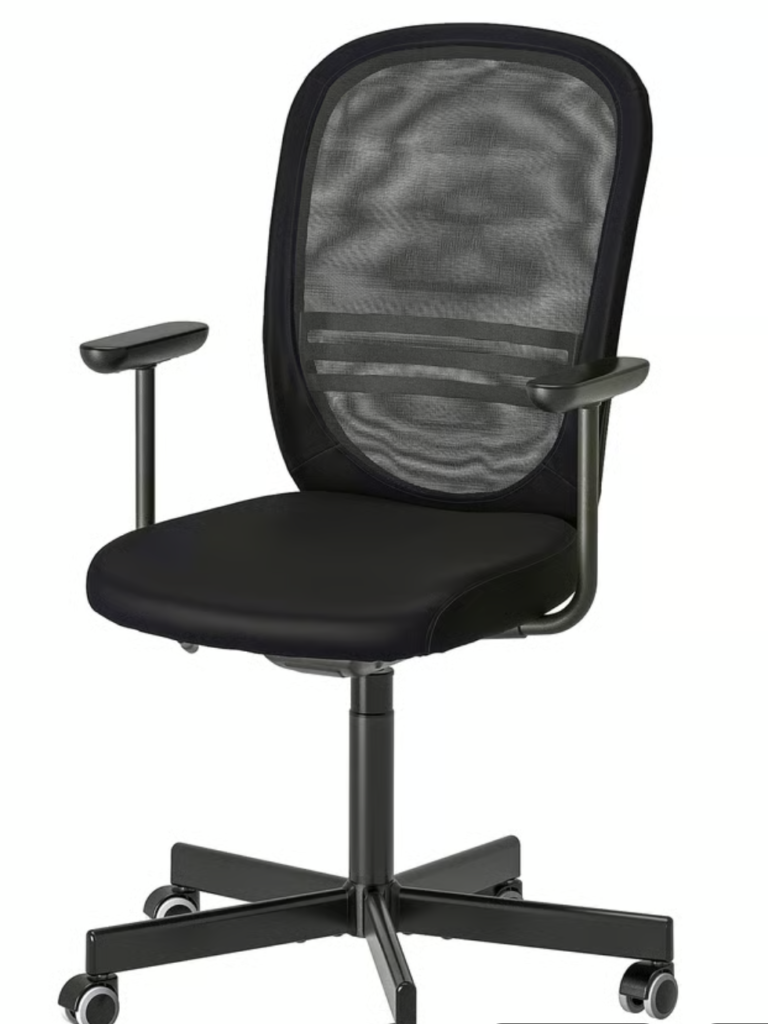
An example: IKEA FLINTAN with armrests
FIXED ARMREST OPTION
IKEA FLINTAN with Armrests
$119.99
Consider it if your desk has enough clearance and you value published testing information.
Trade-off: Armrests don’t fold away during storage.
The IKEA FLINTAN with armrests is listed at $119.99 in the US.
The manufacturer publishes several useful specifications:
| Specification | IKEA FLINTAN with armrests |
|---|---|
| Reference price | $119.99 |
| Minimum armrest height | 27 1/8 in from floor |
| Maximum armrest height | 32 1/4 in from floor |
| Minimum seat height | 17 3/4 in |
| Maximum seat height | 22 7/8 in |
| Seat width | 18 1/8 in |
| Seat depth | 19 1/4 in |
| Tested capacity | 276 lb |
| Limited warranty | 10 years |
Source: IKEA FLINTAN with armrests — US Product Specifications
The published armrest measurements provide a useful starting point for checking whether this chair might clear your desk.
Those figures do not guarantee it will fit every workstation, but they do make the decision easier to evaluate before purchase.
The removable washable cover, published office-chair testing information, and longer limited warranty are also meaningful factors when comparing IKEA with a less established alternative.
And importantly, IKEA offers the FLINTAN without armrests as well.
The decision isn’t simply between FelixKing and IKEA. It’s between different armrest configurations and the trade-offs they create.
FelixKing vs. IKEA FLINTAN: Which Actually Makes More Sense?
At these reference prices, all three options fall around the $100–$120 range.
| Feature | FelixKing Mesh Chair | IKEA FLINTAN Armless | IKEA FLINTAN with Arms |
|---|---|---|---|
| Price | $109.99 | $99.99 | $119.99 |
| Armrest design | Flip-up | None | Fixed, separately installed |
| Adjustable lumbar support | Seller-advertised | Built-in lumbar support | Built-in lumbar support |
| Mesh backrest | Yes | Yes | Yes |
| Manufacturer-stated/tested capacity | 300 lb advertised | 276 lb tested | 276 lb tested |
| Warranty | 5 years advertised | 10-year limited | 10-year limited |
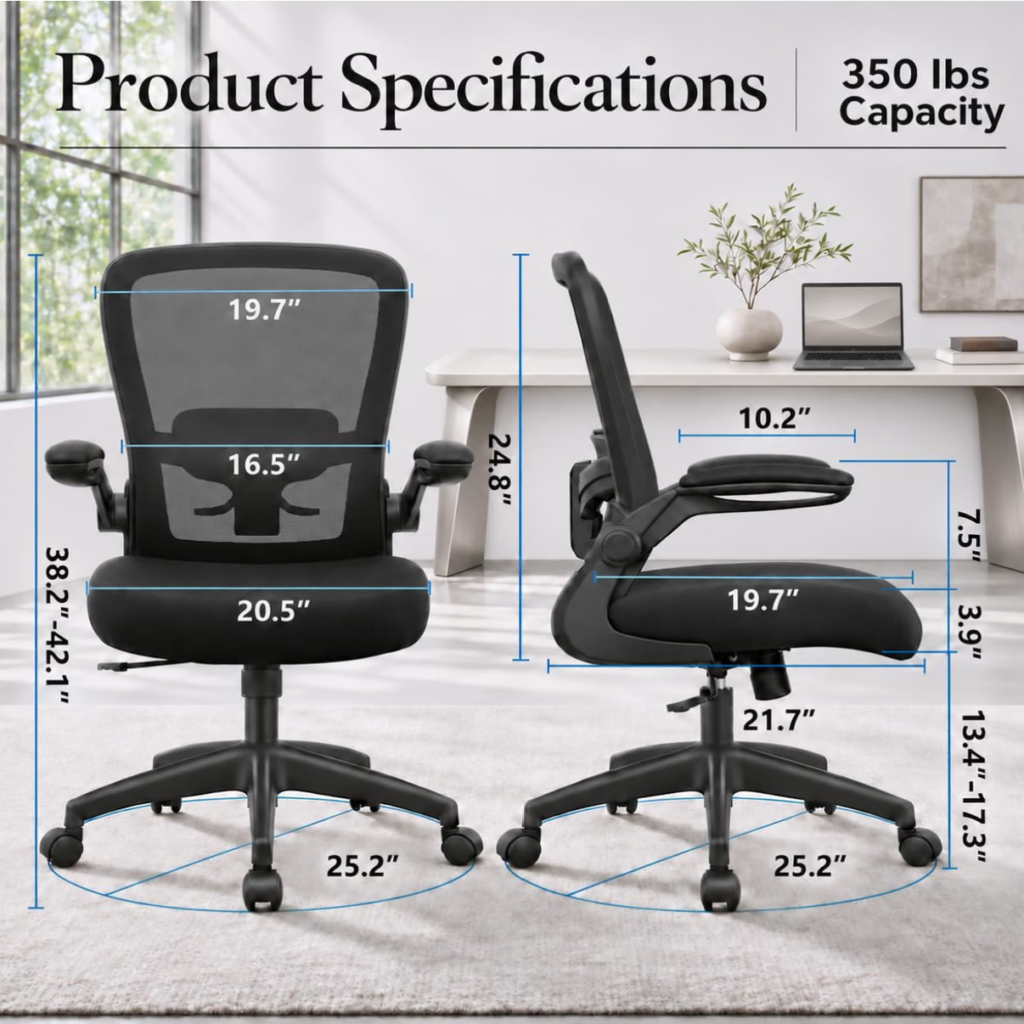
Size of FelixKing Mesh Chair
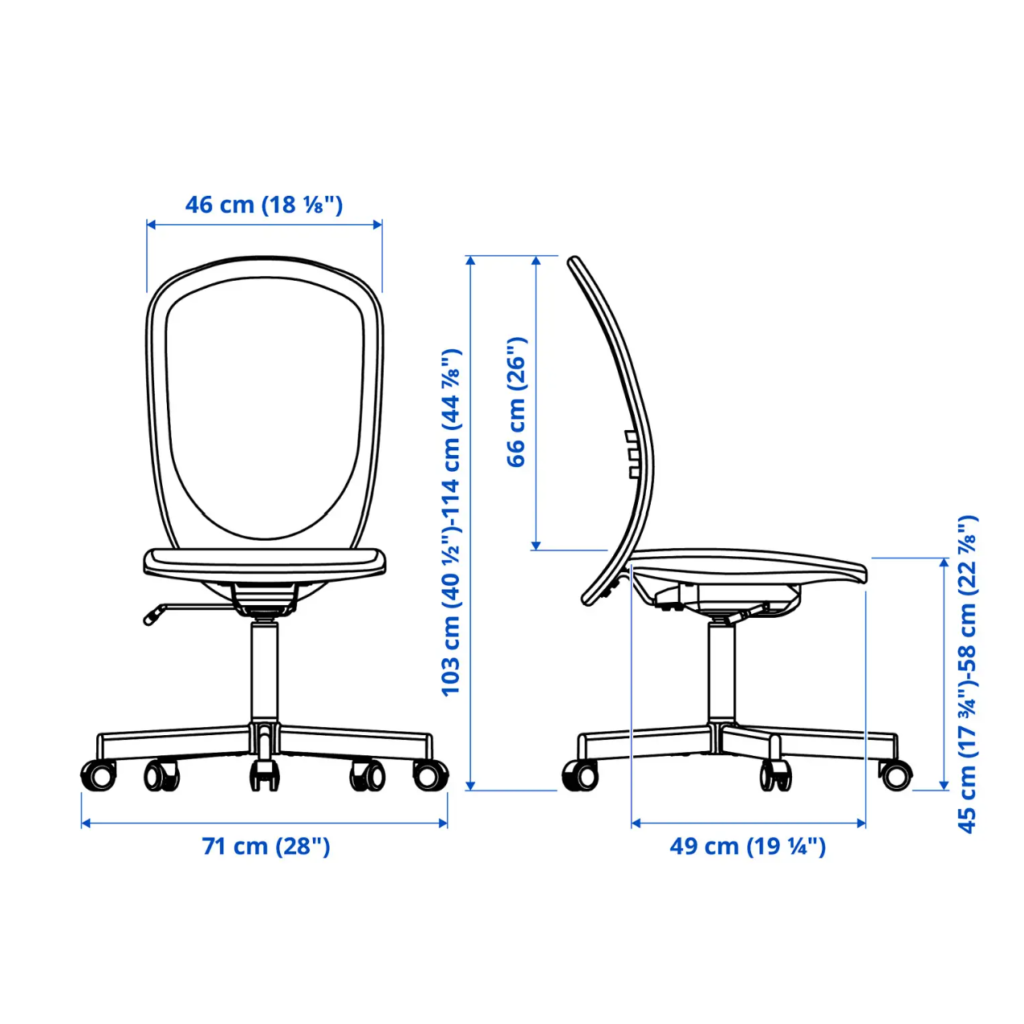
Size of IKEA FLINTAN Armless
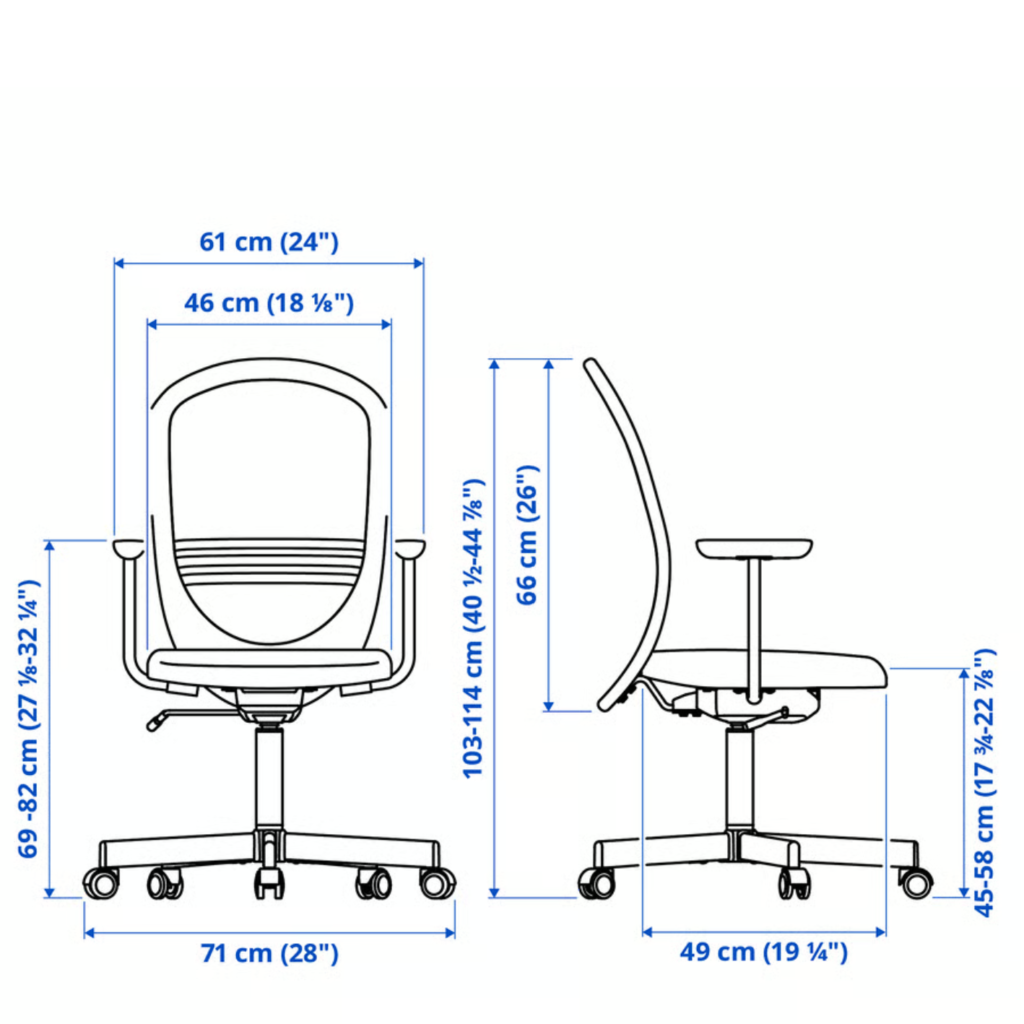
Size of IKEA FLINTAN with Arms
Prices reflect the November 7, 2026 research snapshot. Seller-advertised capacity and verified testing claims are not directly equivalent.
Choose the FelixKing design if…
You genuinely want arm support while working but need to raise the armrests when storing the chair.
The flip-up mechanism is the main reason to consider it over a conventional fixed-arm design.
It isn’t necessarily the most durable or ergonomic choice; those claims would require stronger independent evidence.
Choose the armless IKEA FLINTAN if…
You want fewer side obstructions, don’t need dedicated armrests, and prefer a straightforward budget chair with published testing information and a longer limited warranty.
Choose the IKEA FLINTAN with armrests if…
You want armrests, have adequate clearance, and value the disclosed dimensions, washable cover, testing information, and warranty.
The best choice isn’t the chair with the most features. It’s the chair whose features match how you actually use your desk.
Don’t Fix Desk Clearance by Ruining Your Working Posture
One common workaround is lowering the chair until the armrests fit beneath the desktop.
That’s fine for temporarily storing the chair, but it shouldn’t force you to work at an unsuitable seat height.
OSHA recommends setting up a computer workstation so your shoulders can remain relaxed, your elbows stay close to your body, and your forearms and wrists maintain a comfortable alignment.
The keyboard and mouse should be positioned where you can use them without excessive reaching.
If your chair needs to be too low for comfortable typing just to fit its armrests under the desk, consider a different armrest design, a more adjustable workstation, or a keyboard tray.
And if raising your chair makes your feet lose contact with the floor, a stable footrest may help.
A successful desk setup needs to work in both configurations:
- Working position: Comfortable seating and accessible keyboard and mouse.
- Storage position: Enough clearance to push the chair underneath without forcing or scraping.
Those are different measurements—and both matter.
Sources: OSHA — Good Working Positions and OSHA — Computer Workstation Evaluation Checklist.
Before You Buy: The Office Chair Fit Checklist
Check these items before ordering a replacement chair:
- Measure the lowest obstruction beneath your desk.
- Measure the usable width between desk legs or storage units.
- Set your current chair at a comfortable working seat height.
- Measure the armrest height at that working position.
- Check whether the chair can approach your keyboard without interference.
- Check seat and wheelbase width—not just the armrests.
- For flip-up arms, confirm their fully raised dimensions.
- Verify the new chair’s seat-height adjustment range.
- Compare warranty terms, return conditions, and current price.
- Leave clearance for movement rather than relying on an exact fit.
If the manufacturer doesn’t disclose the dimensions you need, ask for them before purchasing.
Frequently Asked Questions
Not always. Flip-up arms offer more flexibility when storing a chair, but fixed arms can work perfectly well if they provide comfortable support and clear the desk. The best design depends on your workstation and how often you use the armrests.
Some people comfortably work without chair armrests, particularly when the desk allows appropriate forearm support. Others prefer armrests. The important factors are maintaining comfortable shoulder and arm positions, avoiding excessive reaching, and choosing a setup that fits your body.
They don’t necessarily need to remain underneath the desk while you work. What matters is whether they let you position the chair close enough for comfortable keyboard and mouse use. Full under-desk clearance becomes more important if you need to store the chair there.
No. The seat, wheelbase, backrest, desk legs, or drawers can still prevent the chair from fitting. You must check overall dimensions, not just the armrests.
Neither is universally better. FelixKing’s flip-up armrest design may better suit someone who wants arm support while working and extra clearance afterward. IKEA’s armless FLINTAN may be simpler for extremely restricted spaces, while the armrest-equipped FLINTAN has stronger publicly documented testing and warranty information.
There isn’t one universal clearance number that works for every chair. You should confirm that the chair can move into position without contact, account for floor and desk irregularities, and preserve sufficient room for comfortable legs and working posture.
Final Verdict: Solve the Fit Problem Before Replacing the Chair
If your office chair won’t fit under your desk, start with measurements—not brand names.
Flip-up armrests are worth considering when you want forearm support during work and more storage flexibility afterward. The FelixKing mesh chair is a relevant option to investigate at around $110.
An armless chair may be the simplest answer when clearance is extremely limited. IKEA’s $99.99 FLINTAN is a practical alternative to evaluate.
Fixed armrests can still be a good choice if the dimensions work with your setup and you value the support they provide.
Ultimately, the right chair should let you sit close enough to your work, maintain a comfortable position, and fit your available space.
Measure first. Choose the armrest design second. Compare brands third.
Need Arm Support Without the Extra Bulk?
Still deciding? An armless chair may be the simpler option if you don’t need arm support at all.
Disclosure: Smart Desk may earn commissions from qualifying purchases made through affiliate links. This does not affect the price you pay and helps support our research-based content.
Sources & Last Updated
- OSHA — Computer Workstations: Chairs
https://www.osha.gov/etools/computer-workstations/components/chairs
Guidance on chair adjustability, armrest positioning, lumbar support, and workstation fit. - OSHA — Good Working Positions
https://www.osha.gov/etools/computer-workstations/positions
Guidance on neutral working posture, relaxed shoulders, forearm positioning, and proper seating adjustments.
Last Updated: November 7, 2026
Research status: Research-based. Smart Desk has not independently hands-on tested the products discussed in this guide.
Price note: Prices are manufacturer-listed U.S. prices checked November 7, 2026 and may change.